Night Owl
0. What is a clicker?
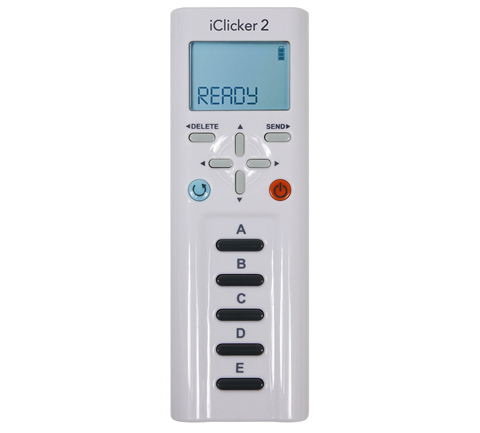
A clicker is a handheld remote with answer buttons A–E. In a lecture, students press an answer and each press transmits a short radio packet to a receiver, which tallies responses and logs attendance.
1. The challenge
Professor Falcon teaches CPSC401 (Wireless Security) at Benevolent Bureau of Birds University and uses clicker devices for attendance. Students transmit answers wirelessly at 917 MHz using frequency hopping spread spectrum (FHSS).
This semester the professor discovered two kinds of cheaters:
- Speed Clickers — click instantly (< 2 s) without reading the question; they just mash random buttons for attendance credit.
- Night Owls — pre‑record their clicker signals at home, then replay them late in class using a different device.
- Legitimate students respond in 2–15 s (normal human reading/thinking time) and have hidden a message in their responses.
During yesterday’s lecture (2026‑03‑29, 2:30 PM) the base station captured 20 s of RF traffic. Your mission: separate cheaters from legitimate students. The recovered message is the flag body, wrapped as
bbb{recovered_message}.
We are given a single file, lecture_capture.iq.
2. Parsing the capture
lecture_capture.iq
80,004,096bytes- 4,096 bytes
ICLKRheader + 80,000,000 bytes of IQ - payload = 10,000,000
complex64samples @ 500 kHz = 20 s of RF at 917 MHz
- 4,096 bytes
Header
The header is a small custom struct beginning with the magic ICLKR. There is no spec so had to guess them (with help of an AI). The last column records how confident each one is and how it was established:
| offset | field | value | how I knew |
|---|---|---|---|
| 0x00 | magic | ICLKR | ✅ obvious |
| 0x05–0x07 | padding | (3 bytes) | ⬜ likely alignment padding |
| 0x08 | version (u32) | 2 | ❓ |
| 0x0C | sample_rate (u32) | 500000 (500 kHz) | 🔎 checked — 500000 is read straight from here; it’s the only rate that makes the file’s size and 20 s length add up, and the data turns into clean tones when you use it (a wrong rate would just give noise) |
| 0x10 | center_freq (u32) | 917000000 (917 MHz) | ✅ obvious |
| 0x14 | u32 | 38000 | ⬜ unknown — never resolved; doesn’t matter for the solve |
| 0x18 | u32 | 0x00555555 (the classic 0x55… preamble) | ❓ |
| 0x1C | u32 | 0x003b8016 (sync word) | ❓ |
| 0x20 | u32 | 3500 (channel spacing / “baud”) | 🔎 checked — guessed “baud”, then confirmed when the FHSS channels landed on exact multiples of 3500 Hz (§3) |
| 0x24 | f32 | 1.25 (mod index) | ❓ |
| 0x28 | f32 | 20.0 (duration, s) | ✅ obvious |
| 0x2C | string | "2026-03-29 14:30" | ✅ obvious |
3. Finding the bursts
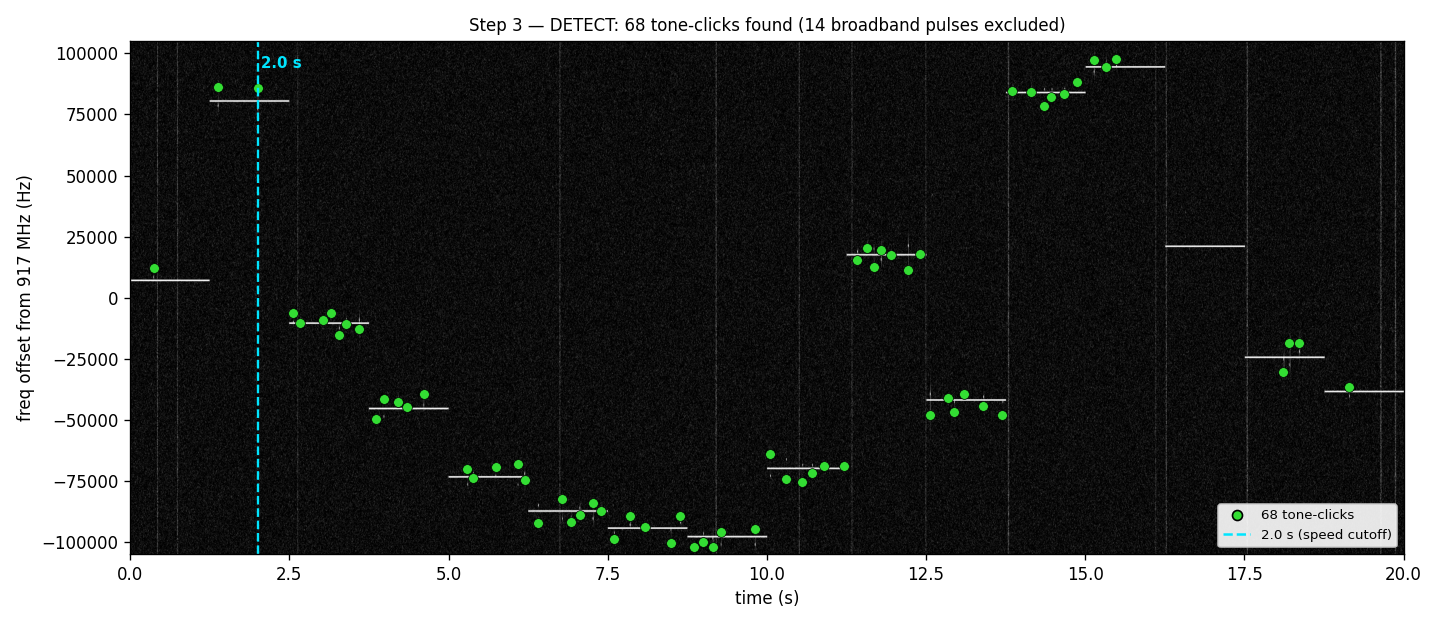
Loaded into a waterfall/spectrogram viewer like Inspectrum, the structure is obvious by eye: discrete bursts scattered across the 20 s, each parked on a clean center tone (its channel). They stand out clearly — no denoising needed. Extracting their exact start/end times: 68 bursts.
Per‑burst structure
For each burst I followed how its frequency changed over time (and double-checked with a spectrogram). Every full click has the same two‑tone shape:
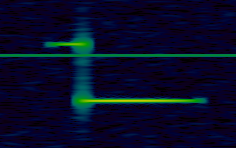
- A short preamble burst during the amplitude ramp‑up.
- A longer data burst for the rest of the burst.
- No hidden modulation inside. Just a burst.
Guesses
Measuring each tone’s frequency precisely (to within a few Hz), two tidy patterns fall out:
- Each student sits on a channel — a frequency that’s an exact multiple of 3500 Hz (
n·3500). That channel numbernis effectively the student’s ID. - Each burst (a click) sits a small, neat distance off that channel — always a multiple of 150 Hz. That
distance ÷ 150 is an integer code
pre_code: Preamble burst code (pre_code = (preamble_burst_freq − n·3500) / 150)data_code: Data burst code (data_code = (data_burst_freq − n·3500) / 150)
This step took me a long time because I thought multiple frequency channels were used for each student (since the challenge said it used FHSS) and tried to find the pattern. But it didn’t work out and I did some research and found that the clickers might not use FHSS (https://mhe.my.site.com/iclicker/s/article/How-to-Set-a-Fixed-Frequency-for-an-iClicker-Base). So I tried the idea that each channel is for a single student.
4. Removing night owls and speed clickers
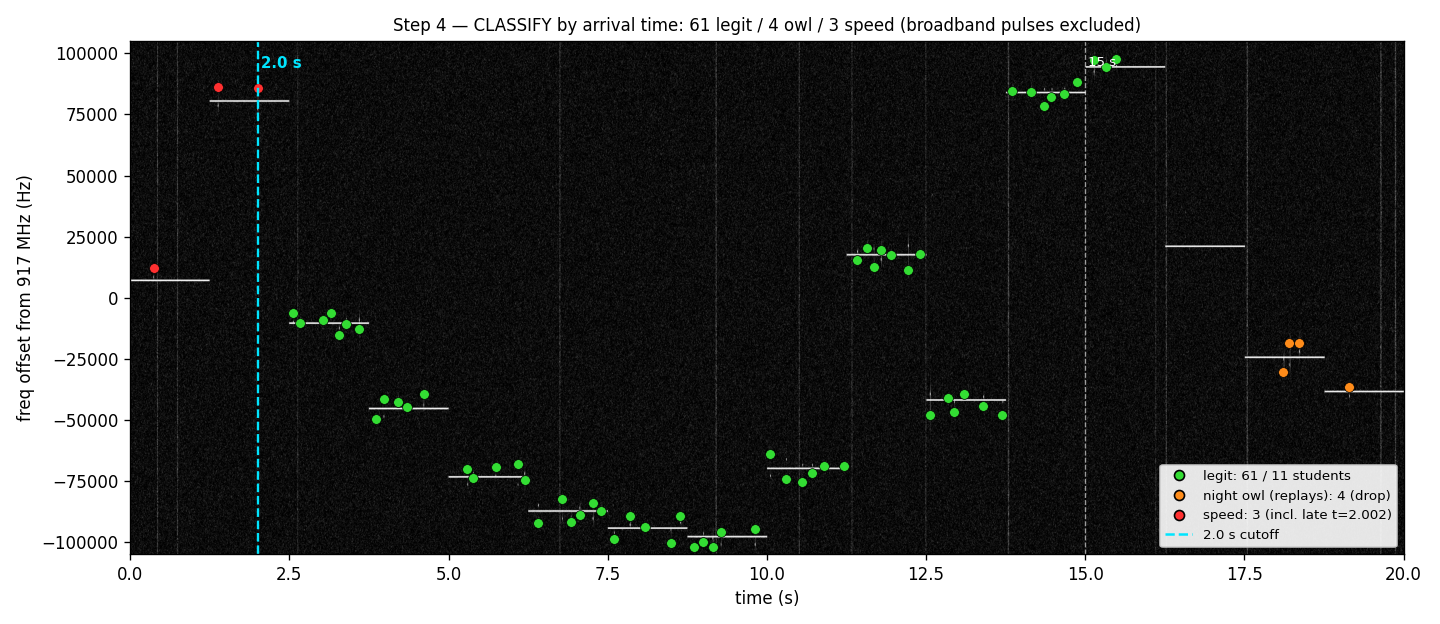
Plotting data‑tone frequency vs. time shows ~16 students, each parked on a constant channel and transmitting a short burst of clicks. It’s time to remove the Night Owls and Speed Clickers.
| class | time | bursts | students | action |
|---|---|---|---|---|
| Speed clickers | < 2 s | 3 | ~2 | drop (random mashing) |
| Legitimate | 2–15 s | 61 | 11 | keep — the message |
| Night owls | > 15 s | 4 | ~3 | drop (replays) |
If the center tone started before 2 sec, I’ve sorted it as a Speed Clicker. If the center tone started between 2 and 15 sec, I’ve sorted it as the Legitimate.
That leaves 11 legitimate students, on channels n = -3, -13, -21, -25, -27, -28, -20, 5, -12, 24, 27, with 61 bursts between them.
5. Narrowing the legit bursts to the answers
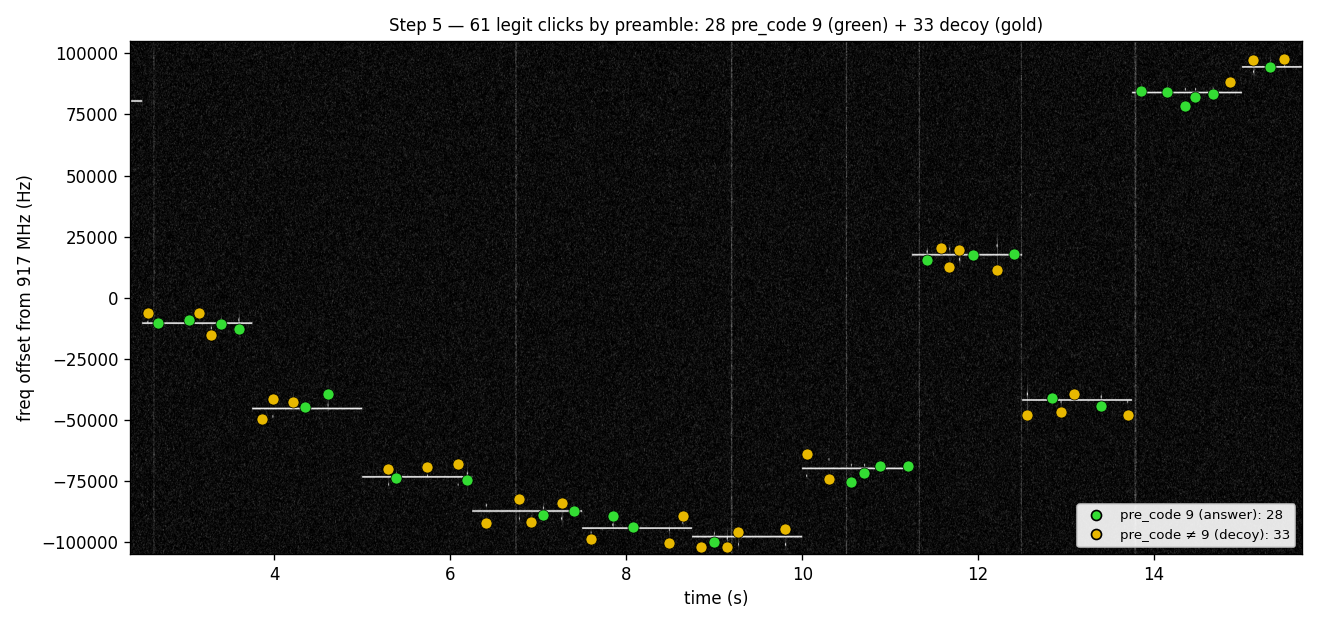
- 61 legit click candidates
- Keep 28 (
pre_code == 9) - drop 33 (
pre_code ≠ 9)
- Keep 28 (
The pre_code == 9 is from the pre_code = (preamble_burst_freq − n·3500) / 150 in section 3. There were other pre_code values (1, 2, 3, 10, 11, 16, 17, 18, 19) and the only thing that generated ‘words’ was ‘9’.
6. The decode
The 28 pre_code == 9 answers’ data codes are a linear map onto ASCII:
codepoint = round( 95 + (data_code·150 + 2250) / 150.8 )- Code −15 →
_(space) && codes −13 … +12 →a…z. - Codes that land outside the printable
a…z/_band are not used.
⬇️Below is the “Out of range” clicks. (pre_code = 9, but out of range)
| data_code | codepoint | |
|---|---|---|
+39 | 149 | beyond printable ASCII (≥ 127) |
+35 | 145 | beyond printable ASCII (≥ 127) |
−36 | 74 | J — valid ASCII, but uppercase |
−37 | 73 | I — valid ASCII, but uppercase |
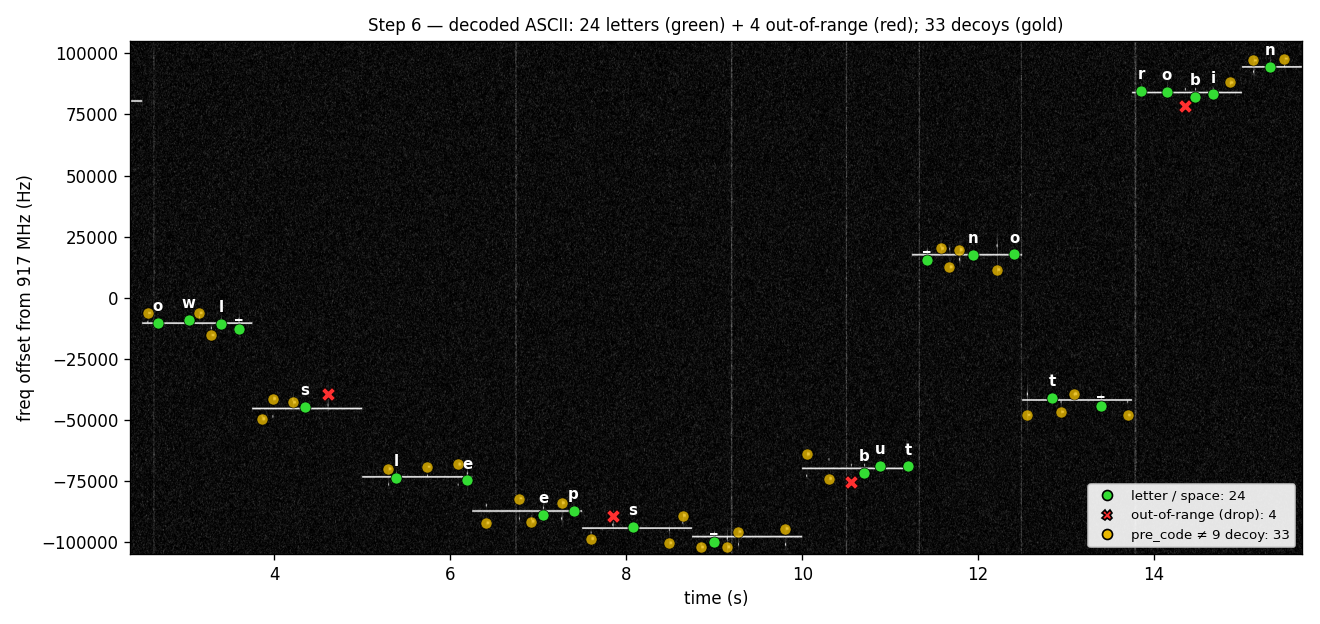
pre_code = 9 click rendered as its decoded ASCII character — the 24 green letters/spaces spell the message reading; red ✕ = the 4 out-of-range; gold = the 33 pre_code ≠ 9 decoys.owl_sleeps_but_not_robin ('_' = the space code, −15)🚩 bbb{owl_sleeps_but_not_robin}
7. Review
I’m not sure whether the signal could be called FHSS. If my solution is correct, since students use their own frequency channels, I think it’s closer to FDMA (Frequency Division Multiple Access). I had to remove ‘J’ and ‘I’ just because they weren’t fitting so maybe there’s a better solution.